
Launching August 2026 — but, you can experience Compugrade right now!

Autograding for Microsoft and Google Apps courses
Compugrade is a powerful new Add-in that delivers instant autograding + real-time student feedback. Finally, more time for teaching and no grading.
-
 Teachers: Reclaim your time so you can focus on teaching
-
 No books, no grading, no files to upload/download
-
 All learning tools live inside of the Microsoft and Google applications
-
 100% AI-Free: Compugrade uses zero AI technology
Watch how Compugrade will revolutionize your Computer Applications courses.
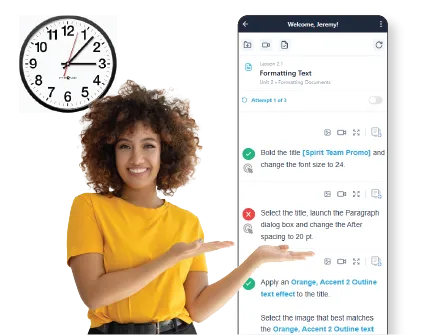
WHY COMPUGRADE?
Revolutionizes Teaching & Learning Computer
Apps
Save hours every week with automatic grading and instant feedback. Give students real-time guidance while concepts are fresh, and spend your time teaching instead of marking papers at 10pm.
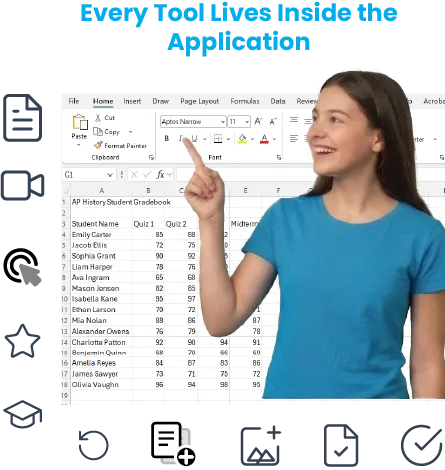
With Compugrade, every learning tool lives inside of the application (Word, Excel, etc). No need for textbooks, paper, grading, switching screens, or downloading/uploading files.
POWERFUL ALL-IN-ONE ADD-IN
All Learning Lives Inside the Microsoft and Google Applications — No More Multitasking Between Tools
Everything lives inside the Microsoft or Google Add-in — no books, no paper, no manual grading. Ever.
-
 Amazing Content Inside the Add-in
-
 Auto Skill Check
-
 Document Comparison Tool
-
 Course Dashboard
-
 Lesson Videos
-
 Auto-loaded Source Files
-
 Assessments & Practice Exams
-
 Re-do Lessons
-
 Set Number of Attempts
-
 Self-contained Student LMS
-
 Image Display & Zoom Tools
-
 Instant Grade Summary
WORKS SEAMLESSLY WITH MICROSOFT & GOOGLE APPLICATIONS
Comprehensive Curriculum for Every Student
Engaging courses spanning Word, Excel, PowerPoint, Google Docs, Sheets, and Slides — all aligned to national standards and MOS certification aligned.
-
Pre-packaged Courses Inside the App
From beginner to advanced — covering all major Microsoft and Google applications.
-
Designed for Grades 6-12
From beginner to advanced — covering all major Microsoft and Google applications.
-
 MOS Certification Aligned
From beginner to advanced — covering all major Microsoft and Google applications.
Compugrade Courses Work Seamlessly
with Microsoft & Google
Microsoft Word
Microsoft Excel

Microsoft PowerPoint

Google Docs
Google Docs

Google Slides
EXPERIENCE COMPUGRADE BEFORE THE BIG LAUNCH IN AUGUST 2026
4 Ways to Experience Compugrade Today
We know teachers are busy. That's why we built four ways to experience Compugrade — from zero setup to the real thing.


1. Watch a Guided Video Lesson
See a full narrated walkthrough
Watch a real Compugrade lesson unfold — from file load to auto-graded submission — narrated step-by-step inside Microsoft Word 365.
No sign-up required · ~10 min


2. Use the Live Beta Lessons (Word 365)
The real thing — 2 live lessons included
With Compugrade, every learning tool lives inside of the application (Word, Excel, etc). No need for textbooks, paper, grading, switching screens, or downloading/uploading files.
Requires add-in install · View requirements


3. Try the Interactive Prototype
Click-through simulation — no install
Explore a click-through simulation of a real Compugrade lesson. See exactly how students navigate tasks, get feedback, and submit — no Microsoft account required.
No sign-up required · ~5 min


4. Schedule a Product Demo
Tailored to your school or district
Meet with a Compugrade team member for a guided walkthrough tailored specifically to your school or district's needs.
Live 10-15 min demo

Revolutionary autograding for K-12 computer applications courses. A product of B.E. Publishing.

A trusted educational publisher with over 30 years of experience building cutting-edge resources.