
PLATFORM FEATURES
Compugrade Features
Everything you need to deliver, grade, and manage computer application courses.
A True Game-Changer for Teaching and Learning Computer Apps
Compugrade was meticulously built over five years by B.E. Publishing's expert development team. It features groundbreaking, patent pending technology never before seen in the education market — powerful tools that don't just promise efficiency, but actually deliver significant time savings and measurably better outcomes for educators and students.

Save Hours Every Week
Automatic grading, instant scoring, and a robust LMS dashboard give you back your evenings. Easily assign, track progress, generate reports, and manage your entire class — all in one place.

Students Learn Faster and Retain More
Immediate feedback while concepts are fresh. The visual document analyzer lets students self-correct in real time, turning mistakes into powerful learning moments instead of frustration.

Engaging, Modern Instruction
Rich interactive lessons with embedded master videos and inline how-to guidance. Students stay focused and motivated because everything happens inside the familiar Microsoft or Google environment.

MOS Certification Ready
Courses aligned to Microsoft Office Specialist (MOS) exams with built-in practice and preparation — helping your students earn industry-recognized credentials.

Everything Lives Inside the App
Lessons,assessments, and all learning tools are contained inside the Microsoft and Google applications. There's no need for textbooks, switching tabs or screens, logging in to a 3rd party LMS, or uploading/downloading files.
POWERFUL ALL-IN-ONE ADD-IN
Revolutionary, Cutting-Edge Features Built Inside the Application
Compugrade includes every tool you need to teach computer applications courses...and, lives inside the application's Add-in. No books, no paper, no grading needed...ever!
Features and Tools Included in Compugrade:
Amazing Content Inside the Add-in
Students compare their work to that of the answer key in real-time. Meaning, a student can view their document at any step in a lesson to see if they are on the right track.
Auto Skill Check
A real-time grading feature that checks if students performed a task and skill properly.
Document Comparison Tool
Students compare their work to that of the answer key in real-time. Meaning, a student can view their document at any step in a lesson to see if they are on the right track.
Course Dashboard
Students navigate through course lessons, set up using a modern style, interactive table of contents.
Lesson Videos
Every lesson is introduced with instructional videos, and these videos are also embedded and segmented at the task level, allowing students to watch video clips specific to the task and skill they are working on.
Auto-loaded Source File Content
No more worrying about providing students with source files or having them upload/send you finished files. All of the source content is pre-loaded on screen at the start of each lesson.
Assessments and Practice Exams
Students are assessed using a hybrid of hands-on and objective questions. And, there are practice certification exams included for Microsoft courses.
Re-do Lessons
Teachers can set a preference to allow students to re-do lessons.
Set Number of Attempts
Teachers can set the number of times a student can reattempt questions and skills within a lesson, maximizing student confidence and learning.
Self-contained Student LMS
Students never need to leave the Microsoft or Google application. Assignment due dates, course progress, and grades are all visible to students.
Image Display and Zoom Tools
Students can view images for the entire lesson, one instruction at a time, and also open the images in a pop-up screen to view in more detail
Instant Grade Summary
Students can view their final grade, along with a grade summary detailing correct and incorrect questions.
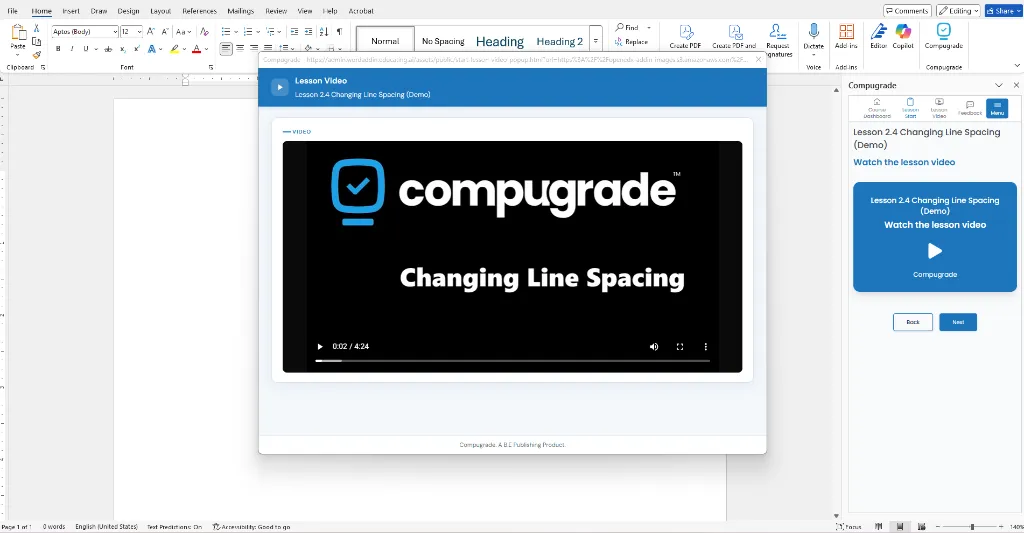
Every lesson includes visually stunning, narrated videos. Students are able to video "skill specific" segments without searching.
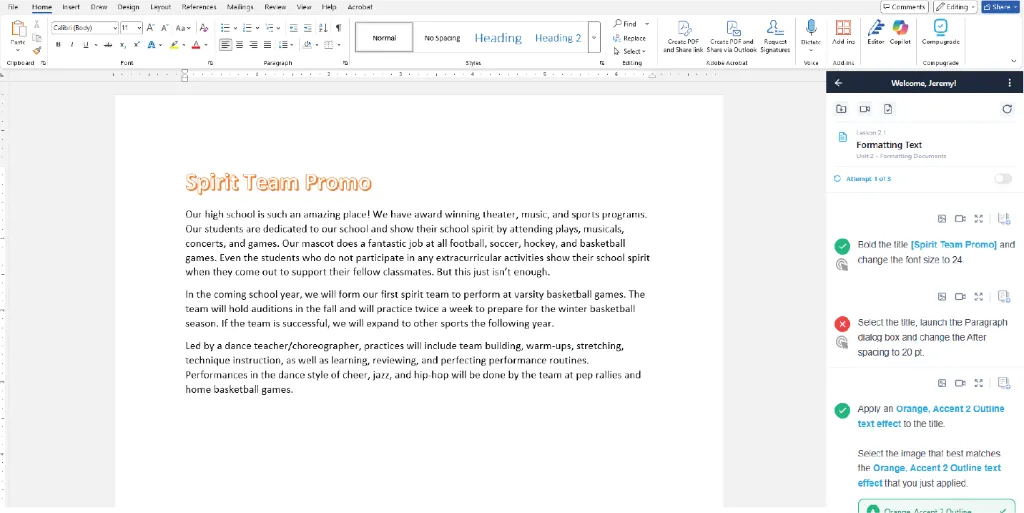
All content is pre-loaded on screen. All instructions are completed in real-time, with instant feedback, grading and optional "lesson re-dos" set by teachers.
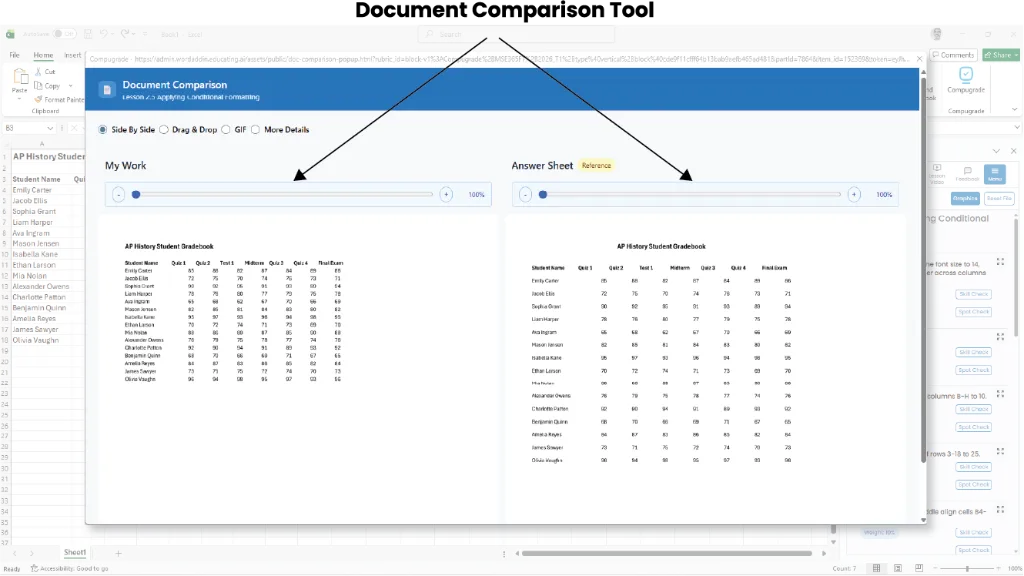
Student's compare their work to the Answer Key in real-time to "Spot Check" their progress on each lesson.
BUILT-IN FEATURE
Real-time Document Comparison Tool
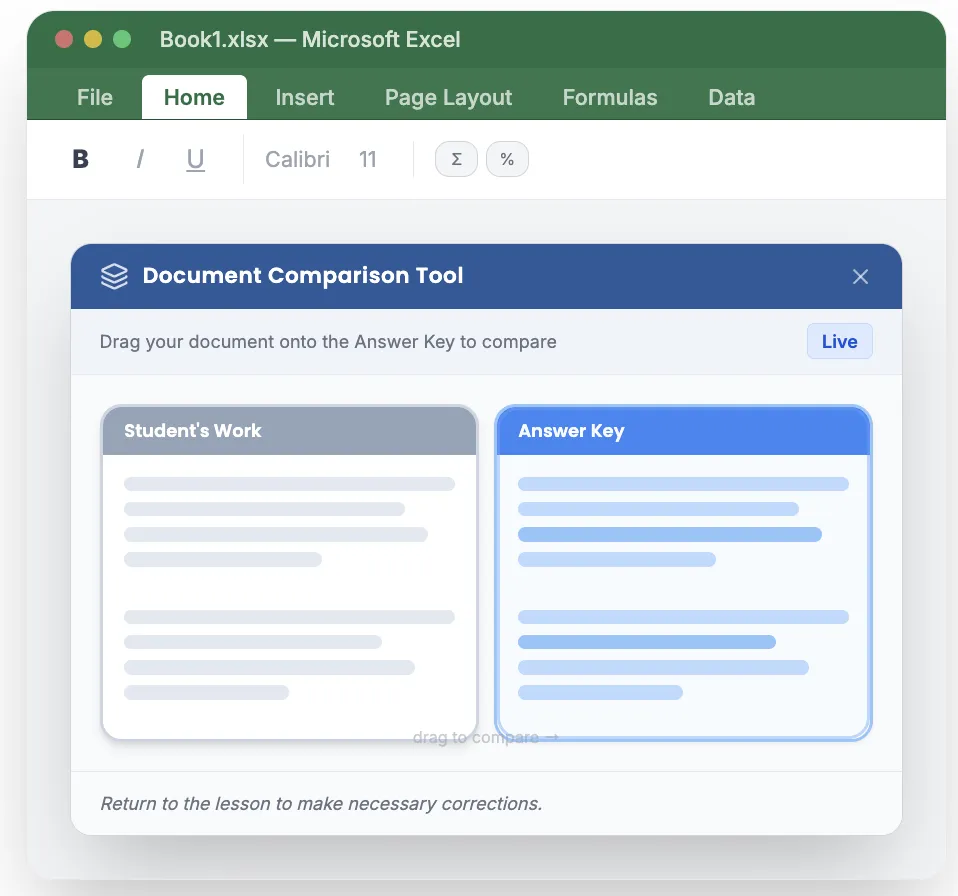
Students can compare and check their document in real-time against the lesson answer key with visual drag-and-drop comparison — so they see exactly what needs to be corrected before submitting.

Revolutionary autograding for K-12 computer applications courses. A product of B.E. Publishing.

A trusted educational publisher with over 30 years of experience building cutting-edge resources.